My Rule 11 config for Survival Mode in Tuxborn 1.2
Tuxborn 1.2, currently available as a beta to interested players, is dropping official support for Survival Mode. Which, obviously, may be highly disappointing to Survival Mode fans! The reason we’re doing this is because we were seeing strange bugs in our configuration that our head dev, Ouroboros, does not currently have time to investigate. So for now, we’re dropping official support for it.
This will mean that if you want to do a Survival Mode run in Tuxborn 1.2, you’re going to have to modify the load order (a.k.a. “Rule 11”) to include your preferred survival mods. And since I was in fact planning on trying a survival run in Tuxborn 1.2 before I was informed we were dropping support for it, I am now planning on doing a Rule 11 myself. This page is to document my intended modset for the benefit of any other Tuxborn players who might want to do the same thing.
And since this is a Rule 11 situation, this is why I’m documenting it here on my own site rather than on the official Tuxborn wiki. It will be supported only by me rather than by the full Tuxborn team.
The primary mods I want to use
Long-time readers of my blog may remember that I tried a Survival Mode run on the Switch, and ultimately found it unsatisfying. This was one of my motivators for getting into modding, in fact! So when I first started learning how to mod, I looked up a bunch of info about what Survival Mode mods were available.
One of the ones that leapt out at me at the time was SunHelm. This bills itself as being lightweight, and it is also highly configurable, which appealed to me on the grounds of being able to keep the parts of Survival Mode that I like, and ditch the parts I don’t.
My configuration is therefore going to feature SunHelm, as well as several patches to make it fit into Tuxborn’s load order better.
The other major part of my config will be Campsite. My reasoning here is, the ability to camp in the wild, and in particular the ability to make a campfire, is vital for a proper survival mode run. We do have a few options for camping in Tuxborn, but I don’t necessarily consider them enough for the task:
- The AE includes a Camping Creation, but the supplies you can make with this are single-use only. And they are also heavy. If you’re going to tromp around in Skyrim’s coldest areas (and let’s get real here, most of the Skyrim map is in fact cold AF), you’re going to have to have a bunch of Camping Supplies in your inventory to avoid freezing to death. Which will eat up your inventory space fast.
- Our load order includes Gore, who comes with custom camping functionality you can take advantage of if you run him as a follower. However, this is only pertinent if you want to run Gore as a follower!
- We also have Legacy of the Dragonborn, which also means we have Rains’ Shelter. The Shelter is a great camping option, and IMO it is the best camping option currently available in Tuxborn. However, you also need to know where to find it. You don’t have to run LOTD’s Tools of the Trade quest to get it, it spawns in the world as soon as you start the game. But you still do have to get to it, and this will likely require you to tromp through cold areas. So you still need camping support before you find it.
Those of you who are fans of Campfire may now be asking, why not Campfire? And I hear you on that. I’ve used Campfire in pre-Tuxborn playthroughs, and yeah, I do like it. SunHelm even supports it! But Campfire is also pretty script-heavy. And since I play Tuxborn on my Steam Deck, I want to have as little impact on Tuxborn’s performance as possible. So I’m opting here for Campsite, which is lighter-weight than Campfire, and which is also supported by SunHelm.
Campsite basically allows you to buy a tent and use that to pitch a camp in the wild. You can also make a fur tent at any tanning rack. Once you have a tent, you can then use it to a) sleep, b) craft things or chop wood, or c) store stuff. And if you have enough firewood in your inventory, you can use that to make a campfire. Which is basically all I really need out of a camping mod.
Current expected list of mods and patches
Here is the full list of things I intend to add to Tuxborn’s load order, in their expected order:
- SunHelm Survival (including the patch for Wyrmstooth provided in its installer)
- SunHelm – CC Farming Patch
- SunHelm Survival – Compatibility Patches
- EVG Conditional Idles – SunHelm Shivering Fix
- Falskaar – SunHelm Cold Patch
- Midwood Isle – Sunhelm Buckets
- Static SunHelm Rewritten
- SunHelm – BS Bruma Patch
- Campsite
There are three more mods I’ll call out here even though I will not be using them:
- Water-Borne Diseases for SunHelm: I like the idea of this one, but I’m not feeling quite hardcore enough in my survival mode expectations to try it out! People who’d like to be harder core than me in your survival run may want to give this a look, though.
- SunHelm – Ultrawide Patch: I play on Steam Deck so this is absolutely not relevant to me. However, we periodically have Tuxborn players ask about ultrawide support. The Tuxborn team can’t give ultrawide support, none of us have appropriate monitors to doublecheck configurations! But I’m offering this in case anyone who wants to replicate my config is playing on an ultrawide monitor. If that’s you, you’ll want this mod too.
- Survival Control Panel: Overlaps with stuff that SunHelm sets, but not entirely. If you want to be able to turn off having to sleep to level up, you should add this mod in too.
Where I’m putting things in the load order
The most critical thing to remember when doing a Rule 11 on the Tuxborn load order is that everything you want to add, and I do mean everything, needs to be somewhere above the map mods we’re using. Our map mods really, really, really want to be last in the load order, full stop. It doesn’t matter what you’re adding. If it stays after the map mods in the load order, the maps will break.
I decided to stick my test additions in right after the “Misc” section in Tuxborn’s MO2 list. I’m using the Tuxborn – Deck profile, but I’d do the same on any other profile as well. Just to give my additions a little more clarity, I also created a separator they could all live under.
Once I added each mod, I then positioned it in MO2 in that part of the load order, on the left side. Likewise, on the right side, I moved all added plugins up to a similar position in that list. Once I did these things, my MO2 then looked like this:
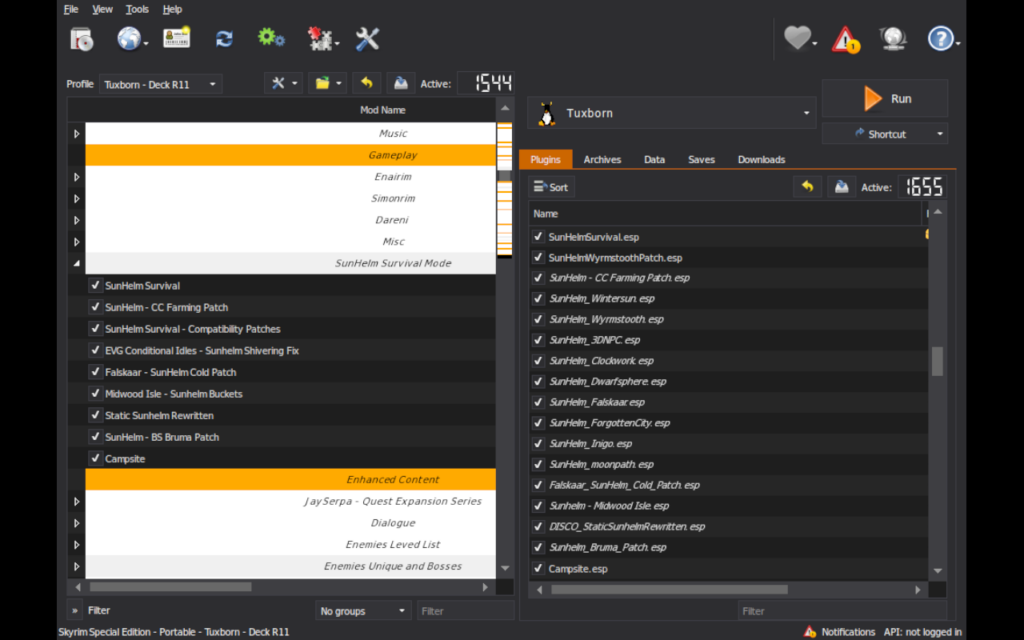
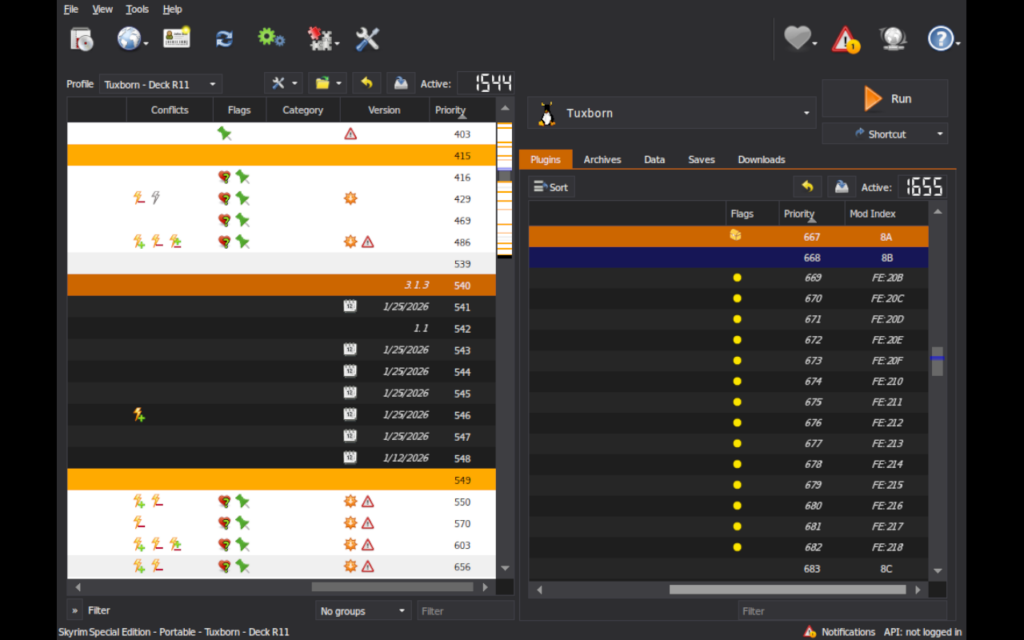
The first of these screenshots shows where I put the mods into the load order on the left side of MO2. The second one scrolls that side of MO2 horizontally so you can see the Priority numbers for each mod, which is what reflects their position in the load order. On the right side of the second screenshot, I’m also showing the load order numbers for the plugins installed by the various mods.
Anybody who wants to try to replicate my setup, you should use those load order numbers as a guide.
‼️ Caveat: If you’re using a Handheld or Desktop profile, or if you’re using Tuxborn MCO – Deck, the load order numbers WILL BE DIFFERENT FOR YOU. You may also have different numbers involved if you’re going to R11 anything else into your load order. Use my numbers as a guide, not as an exact requirement! ‼️
So far, using these additions to the load order, I haven’t found any obvious conflicts with other content in the modpack. But I will, of course, conduct additional testing.
Starting SunHelm
So far in my testing, I’ve seen that Tuxborn 1.2’s setup is completely hiding the toggle to activate Survival Mode. Also, SunHelm does not auto-launch. You have to do one of two things to turn it on:
- Play through its starting mini-quest as soon as you begin your character, which asks you to go find a bed. Once you do this, you’re prompted to confirm you want to turn on the mod.
- Activate it using the SunHelm MCM.
I’ve tried it both ways, and what I see so far is that if I try to do the mini-quest, SunHelm immediately turns itself off again as soon as the quest concludes. Which, y’know, not helpful.
So my recommendation here is going to be option 2. Just turn it on directly in the MCM. You can do this while still in the chargen cell, or you can do it once you’re out of there and starting actual play. Either way, the mini-quest should immediately conclude without you having to care about it.
Other points of interest
Sleep to level up
This appears to be the one thing SunHelm doesn’t have an option for in its MCM, and SunHelm does enforce you needing to sleep to level up.
So if this is a thing you might want to not have in your config, you may need to also add Survival Control Panel, as noted above.
Waterskins
SunHelm, unlike vanilla Survival Mode, cares about Thirst as well as Hunger. You’ll need to keep yourself hydrated! The mod adds waterskins as a thing you can carry around with you. You can make one at a tanning rack, or, if you’re in an inn, you should find that the innkeeper will have a new dialogue prompt to ask for your waterskins to be refilled for 10 gold. If you don’t actually have a waterskin on you, this should get you one as well.
Each waterskin is good for three uses, at which point you’ll need to fill it again.
You can fill waterskins at bodies of water, using a new lesser power provided by the mod. You need to be actually standing in the water for this to work.
SunHelm has an option you can turn on to show your waterskin on your character, if you want to! Though the default location for it does seem rather awkward to me, LOL:
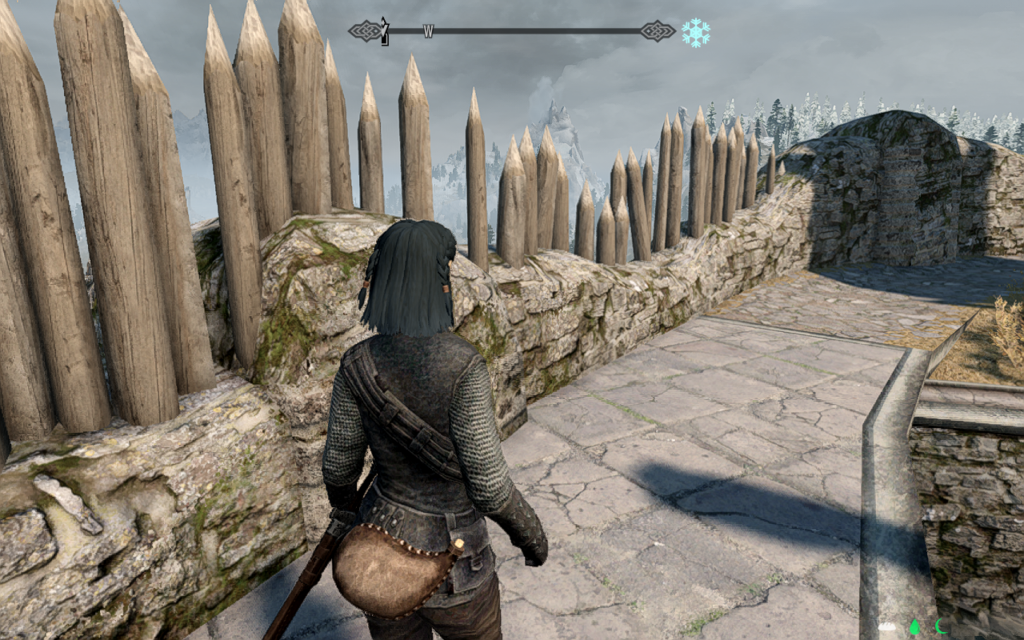
You can, at least, also configure where the waterskin appears by default. It can be on your right or left side, as well.
Salt water is a thing SunHelm tracks, too. You can fill your waterskin at salty bodies of water (such as the Sea of Ghosts), but salt water isn’t drinkable. AFAIK you should be able to correct this problem at a cooking fire. I will be doublechecking this.
Cold
SunHelm has a custom icon to track cold conditions, similar to the one in vanilla Survival Mode. By default this thing appears up to the right of the compass. In my install, the icon overlapped a bit with the compass, since I had made mine bigger for visibility. SunHelm’s MCM does allow you to adjust the positioning of that icon, though, so you can move it around if you need to.
SunHelm does also support showing Warmth ratings on gear, from what I’ve seen so far. I’ll be keeping an eye on how universal this is, and whether we have any armor sets in our load order that aren’t properly showing Warmth ratings when viewed in SkyUI.
Needs icons
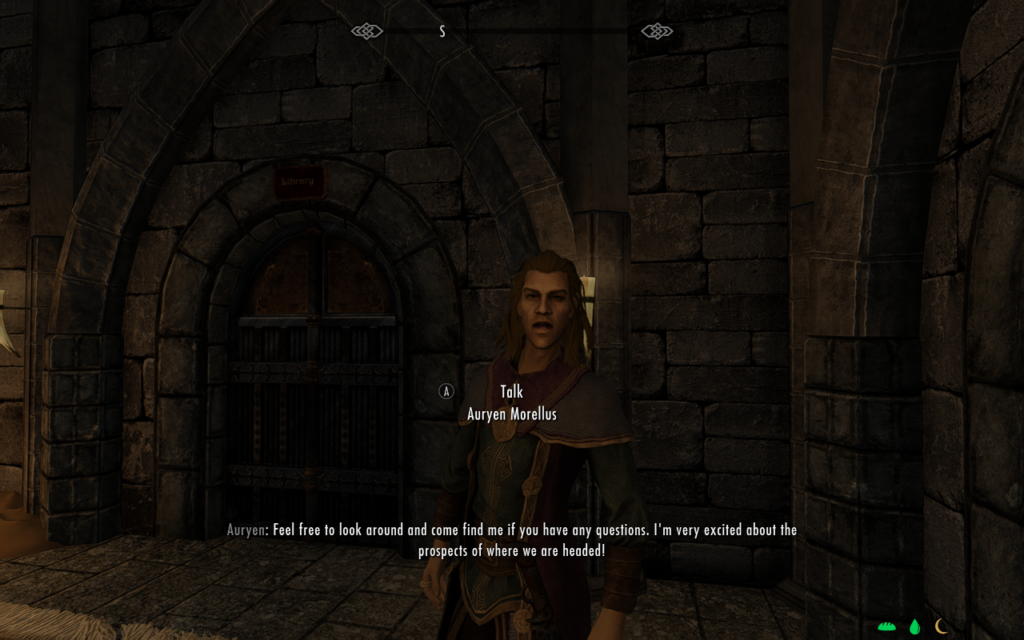
At the bottom of the screen, SunHelm adds three icons that track your Hunger, Thirst, and Exhaustion status. I’ve seen these switch off between green, white, and yellow so far. There are accompanying notifications that show up where you’d expect, in the top left corner of the screen, if you need to eat, drink, or rest. Initial changes to those statuses will also give you a prompt to tell you what’s going on, but that happens just once.
Unknown food items
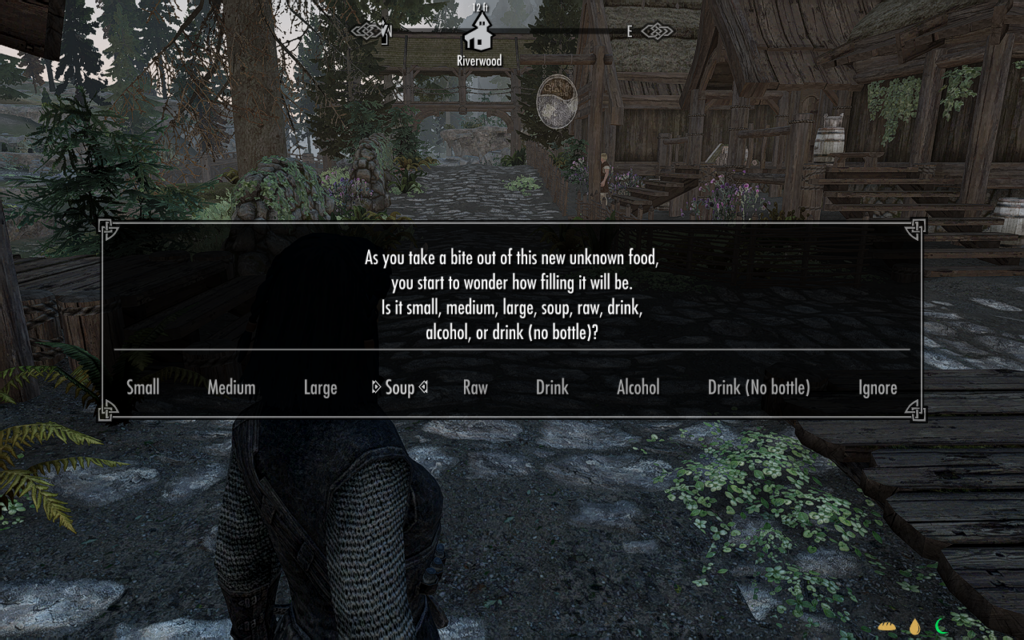
SunHelm supports keywords on food, and if you eat a thing it doesn’t recognize, it’ll even prompt you to tell it what kind of food it is:
Tents
Last but not least, Campsite makes use of tents that are already in the game. I was able to find Imperial and Nordic style tents sold by Sayma at Bits and Pieces. Tents should be available from any general goods merchant, as well as Khajiit traders. You can also make fur tents with appropriate materials at a tanning rack.
I also know as of my testing so far that Campsite, like trying to use AE Camping Supplies, enforces not pitching a tent inside of a city or dungeon. You get an error about this if you try to do that.
My personal config choices
Things I’m doing to configure my setup are as follows, do these or not according to your own preferences:
- Deactivated the carry weight penalty. I’m a loot goblin, dammit, I want to carry all the things. 🤣
- Making sure fast travel is still enabled. I’m going to try to play a no-fast-travel run anyway, but fast travel needs to be on in order for the Dev Aveza to work, so not turning that off.
- I may also lessen the severity of reaction to cold conditions, just because that’s the thing that I found most frustrating about vanilla survival mode.
- I may or may not keep the setting for a visible waterskin on, depending on how well it behaves with any other gear visible upon my person
Things I’ll be testing next
- Loading up SSEEdit to make sure none of the mods have any conflicts under the hood that I need to know about
- Doing a bit more actual playtesting
- Confirm if Campsite allows for turning off enforcing where you can pitch a tent, thinking ahead to scenarios like long dungeons where you can keel over from fatigue partway through because you don’t have a safe place to sleep
- Experiment with cold settings to see if I need to dial them down some to make them be less annoying
- As noted above, keeping an eye out for any armor pieces or jewelry that aren’t reporting Warmth ratings in SkyUI
- Experiment with the waterskin placement, just to doublecheck that it doesn’t overlap with my preferred weapons
- Verify how to purify a waterskin filled with salt water
- And preferably also what places you get salt water from? Assuming this will be the Sea of Ghosts anywhere along the north edge of the map, but probably also in Dawnstar and Windhelm…?
- Verify what happens if I bring a salt pile and an empty waterskin to a cooking fire, since that’s apparently a thing, and it makes no sense to me yet

Angela Korra'ti
As Angela Highland, Angela is the writer of the Rebels of Adalonia epic fantasy series with Carina Press. As Angela Korra'ti, she writes the Free Court of Seattle urban fantasy series. She's also an amateur musician and devoted fan of Newfoundland and Quebecois traditional music.