Survival Mode R11 config for Tuxborn 1.2 (SunHelm settings)
This page covers my observations about how SunHelm works, and what settings I expect to use with it. This data should be applicable to both of my proposed R11 configs for running Survival Mode in Tuxborn 1.2.
Starting SunHelm
So far in my testing, I’ve seen that Tuxborn 1.2’s setup is completely hiding the toggle to activate Survival Mode. Also, SunHelm does not auto-launch. You have to do one of two things to turn it on:
- Play through its starting mini-quest as soon as you begin your character, which asks you to go find a bed. Once you do this, you’re prompted to confirm you want to turn on the mod.
- Activate it using the SunHelm MCM.
I’ve tried it both ways, and what I see so far is that if I try to do the mini-quest, SunHelm immediately turns itself off again as soon as the quest concludes. Which, y’know, not helpful.
So my recommendation here is going to be option 2. Just turn it on directly in the MCM. You can do this while still in the chargen cell, or you can do it once you’re out of there and starting actual play. Either way, the mini-quest should immediately conclude without you having to care about it.
Sleep to level up
This appears to be the one thing SunHelm doesn’t have an option for in its MCM, and SunHelm does enforce you needing to sleep to level up.
So if this is a thing you might want to not have in your config, you may need to also add Survival Control Panel, as noted above.
Waterskins
SunHelm, unlike vanilla Survival Mode, cares about Thirst as well as Hunger. You’ll need to keep yourself hydrated! The mod adds waterskins as a thing you can carry around with you. You can make one at a tanning rack, or, if you’re in an inn, you should find that the innkeeper will have a new dialogue prompt to ask for your waterskins to be refilled for 10 gold. If you don’t actually have a waterskin on you, this should get you one as well.
Each waterskin is good for three uses, at which point you’ll need to fill it again.
You can fill waterskins at bodies of water, using a new lesser power provided by the mod. You need to be actually standing in the water for this to work.
SunHelm has an option you can turn on to show your waterskin on your character, if you want to! Though the default location for it does seem rather awkward to me, LOL:
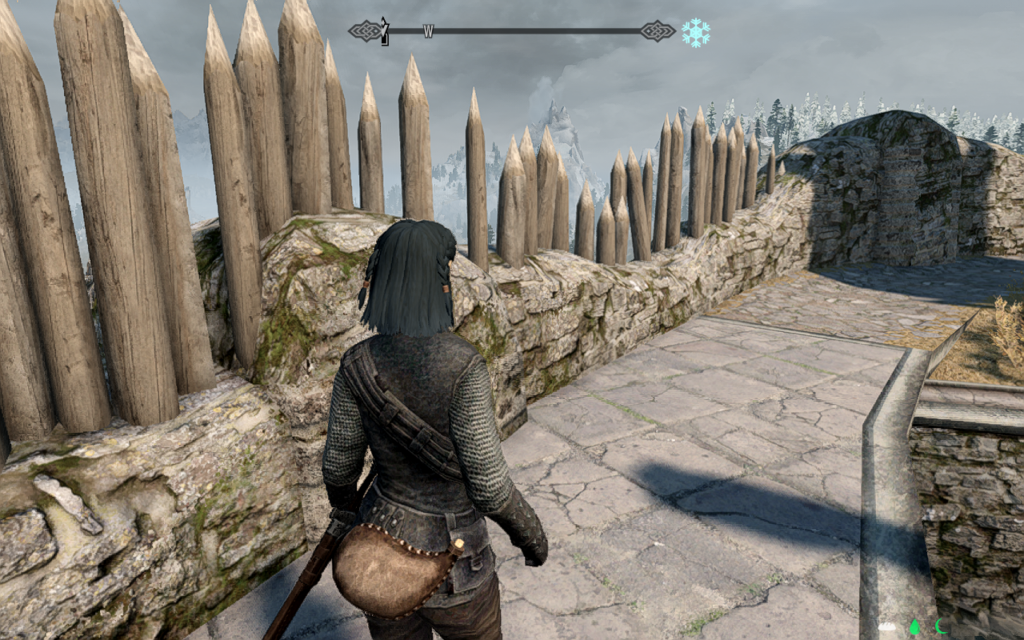
You can, at least, also configure where the waterskin appears by default. It can be on your right or left side, as well.
A warning about the waterskin thing, though: the waterskin and Tuxborn’s wearable lanterns use the same equipment slot! So if you turn on the one, you cannot have the other. You’ll have to choose which is more important to you. My personal choice on this is the lantern, since that’s way more critical IMO to a Tuxborn run.
However, if you decide to use other light sources (torches, the handheld lanterns available in the beta, Candlelight spell, etc.), you should be fine with showing the waterskin in your preferred location.
Salt water is a thing SunHelm tracks, too. You can fill your waterskin at salty bodies of water (such as the Sea of Ghosts), but salt water isn’t drinkable. AFAIK you should be able to correct this problem at a cooking fire. I will be doublechecking this.
Cold
SunHelm has a custom icon to track cold conditions, similar to the one in vanilla Survival Mode. By default this thing appears up to the right of the compass. In my install, the icon overlapped a bit with the compass, since I had made mine bigger for visibility. SunHelm’s MCM does allow you to adjust the positioning of that icon, though, so you can move it around if you need to.
SunHelm does also support showing Warmth ratings on gear, from what I’ve seen so far. I’ll be keeping an eye on how universal this is, and whether we have any armor sets in our load order that aren’t properly showing Warmth ratings when viewed in SkyUI.
Needs icons
At the bottom of the screen, SunHelm adds three icons that track your Hunger, Thirst, and Exhaustion status. I’ve seen these switch off between green, white, and yellow so far. There are accompanying notifications that show up where you’d expect, in the top left corner of the screen, if you need to eat, drink, or rest. Initial changes to those statuses will also give you a prompt to tell you what’s going on, but that happens just once.

Unknown food items
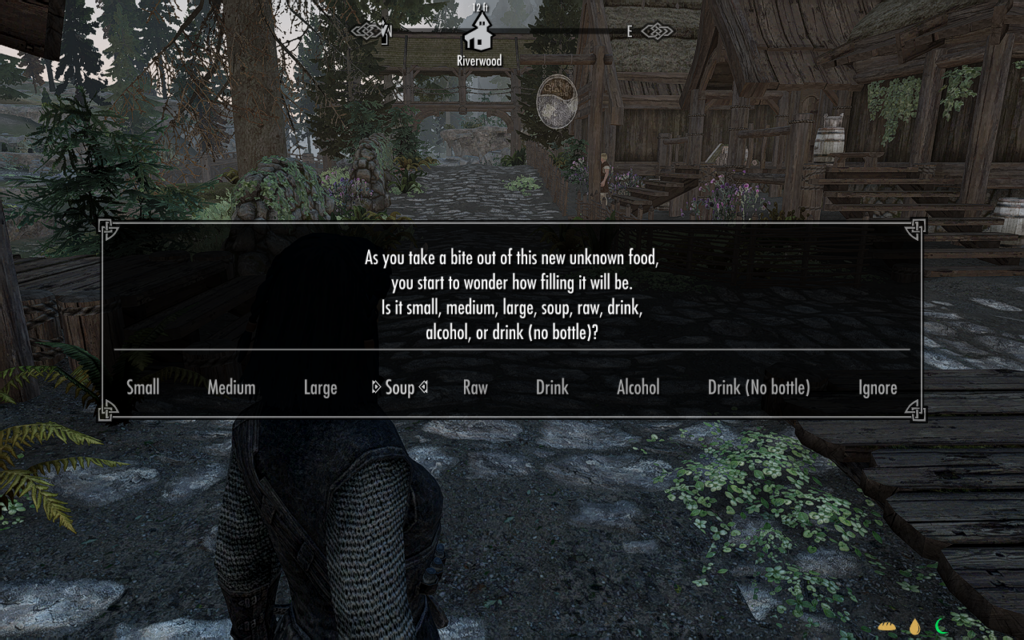
SunHelm supports keywords on food, and if you eat a thing it doesn’t recognize, it’ll even prompt you to tell it what kind of food it is:
My personal config choices
Things I’m doing to configure my setup are as follows, do these or not according to your own preferences:
- Deactivated the carry weight penalty. I’m a loot goblin, dammit, I want to carry all the things. 🤣
- Making sure fast travel is still enabled. I’m going to try to play a no-fast-travel run anyway, but fast travel needs to be on in order for the Dev Aveza to work, so not turning that off.
- I may also lessen the severity of reaction to cold conditions, just because that’s the thing that I found most frustrating about vanilla survival mode.
- As noted above I am keeping the setting for showing a visible waterskin off, since it interferes with wearable lanterns, and I consider lanterns higher priority
- Tuxborn player Gallowsborn alerted me that SunHelm’s installer includes an optional module for turning on diseases support, so I will try that
Things I’ll be testing next
- Experiment with Cold settings to see if I need to dial them down some to make them be less annoying
- Keeping an eye out for any armor pieces or jewelry that aren’t reporting Warmth ratings in SkyUI
- Experiment with the waterskin placement, just to doublecheck that it doesn’t overlap with my preferred weapons ✅
- Verify how to purify a waterskin filled with salt water ✅
- And preferably also what places you get salt water from? Assuming this will be the Sea of Ghosts anywhere along the north edge of the map, but probably also in Dawnstar and Windhelm…?
- Verify what happens if I bring a salt pile and an empty waterskin to a cooking fire, since that’s apparently a thing, and it makes no sense to me yet
- Re-install SunHelm to activate the diseases module in the installer ✅

Angela Korra'ti
As Angela Highland, Angela is the writer of the Rebels of Adalonia epic fantasy series with Carina Press. As Angela Korra'ti, she writes the Free Court of Seattle urban fantasy series. She's also an amateur musician and devoted fan of Newfoundland and Quebecois traditional music.