Survival Mode R11 config for Tuxborn 1.2 (SunHelm setup)

This page covers my intended patches to use with SunHelm, my observations about how SunHelm works, and what settings I expect to use with it. This data should be applicable to both of my proposed R11 configs for running Survival Mode in Tuxborn 1.2.

This info is now current as of Tuxborn 1.2’s beta 3 build.

Patches I’m going to use

The following are the primary mods I’ll use with SunHelm in both the Campfire and Campsite versions of this setup:

The original plan for this set of patches was to use Static SunHelm. The problem this patch is trying to solve is that SunHelm’s nerfing of your XP gain rates at different levels of Fatigue can break how Static Skill Leveling works.

However, the beta 2 and beta 3 builds for Tuxborn 1.2 brought in an additional complication: the Constellations mod, which adds three extra skill trees to the Tuxborn load order. Ouroboros also deployed a patch for Constellations, to make it play nicely with Static Skill Leveling Rewritten.

And in testing my setup against beta 3, with the help of Tuxborn player Labernik06, I discovered that the Static Skill Leveling patch for Constellations was fighting with the Static SunHelm patch. The conflict between them was causing the entries for the Constellations skills to not display properly in the Static Skill Leveling UI, whenever you leveled up.

Fortunately, there’s a different patch available called Static SunHelm Rebalanced, which takes a different approach to compatibility with Static Skill Leveling Rewritten–and, in fact, an approach better suited to the Tuxborn load order. Static SunHelm does not account for your load order also containing the Experience mod, which makes XP skill gains entirely irrelevant. Static SunHelm Rebalanced therefore converts the XP gain nerfs to Carry Weight nerfs instead.

So moving forward, this setup will use that patch instead, for both the Campsite and Campfire versions.

There are some additional mods and patches I’ll call out here even though I will not be using all of these:

  • Water-Borne Diseases for SunHelm: I like the idea of this one, but I’m not feeling quite hardcore enough in my survival mode expectations to try it out! People who’d like to be harder core than me in your survival run may want to give this a look, though.
  • Campfire Patch for Water-Borne Diseases for SunHelm: If you’re going to run the previous mod in this list, and you also want to run the Campfire version of my config, you might also pick this patch up too. It allows for Water-Borne Diseases’ crafting recipes to be used at a Campfire campsite.
  • SunHelm – Ultrawide Patch: I play on Steam Deck so this is absolutely not relevant to me. However, we periodically have Tuxborn players ask about ultrawide support. The Tuxborn team can’t give ultrawide support, none of us have appropriate monitors to doublecheck configurations! But I’m offering this in case anyone who wants to replicate my config is playing on an ultrawide monitor. If that’s you, you’ll want this mod too.
  • Survival Control Panel: Overlaps with stuff that SunHelm sets, but not entirely. If you want to be able to turn off having to sleep to level up, you should add this mod in too.
  • Static SunHelm Rebalanced Harsher: This is an optional extra patch provided on the Files tab for Static SunHelm Rebalanced. It will give you harsher carry weight penalties and a few extra debuffs on attributes as well, if you’re feeling hardcore about your Survival Mode. While I am not likely to use this patch, Labernik06 did test it and confirmed it works.

Things I activated when installing

For SunHelm itself, I did the following two things:

  1. Turned on the optional module to overhaul how diseases work, because okay sure why not
  2. Turned on the patch that allows for SunHelm to track your needs status while on Wyrmstooth

For SunHelm Survival – Compatibility Patches, I explicitly turned off the patch for Interesting NPCs, on the grounds that Gourmet in our load order is also patching against Interesting NPCs. And I wanted to give precedence to Gourmet on that, to uphold as much of Tuxborn’s load order as possible.

Starting SunHelm

So far in my testing, I’ve seen that Tuxborn 1.2’s setup is completely hiding the toggle to activate Survival Mode. Also, SunHelm does not auto-launch. You have to do one of two things to turn it on:

  1. Play through its starting mini-quest as soon as you begin your character, which asks you to go find a bed. Once you do this, you’re prompted to confirm you want to turn on the mod.
  2. Activate it using the SunHelm MCM.

I’ve tried it both ways, and what I see so far is that if I try to do the mini-quest, SunHelm immediately turns itself off again as soon as the quest concludes. Which, y’know, not helpful.

So my recommendation here is going to be option 2. Just turn it on directly in the MCM, and do so while you’re still in the Paradigm chargen room. Otherwise, SunHelm’s initial mini-quest will try to launch as soon as you’re out of chargen, and you’ll run into the problem of SunHelm turning itself off as soon as you try to change anything in the MCM.

Saving your SunHelm config

SunHelm has custom profiles support under Profiles in its MCM. Once you get SunHelm’s settings the way you want them, you might want to take the time to save yourself a custom profile to load again later if something goes wrong with your load order. Or, if you want to use the same setup again in a later load order.

Sleep to level up

This appears to be the one thing SunHelm doesn’t have an option for in its MCM, and SunHelm does enforce you needing to sleep to level up.

So if this is a thing you want to turn off, you will need to also add Survival Control Panel, as noted above.

Waterskins

SunHelm, unlike vanilla Survival Mode, cares about Thirst as well as Hunger. You’ll need to keep yourself hydrated! The mod adds waterskins as a thing you can carry around with you. You can make one at a tanning rack, or, if you’re in an inn, you should find that the innkeeper will have a new dialogue prompt to ask for your waterskins to be refilled for 10 gold. If you don’t actually have a waterskin on you, this should get you one as well.

Each waterskin is good for three uses, at which point you’ll need to fill it again.

You can fill waterskins at bodies of water, using a new lesser power provided by the mod. You need to be actually standing in the water for this to work.

SunHelm has an option you can turn on to show your waterskin on your character, if you want to! Though the default location for it does seem rather awkward to me, LOL:
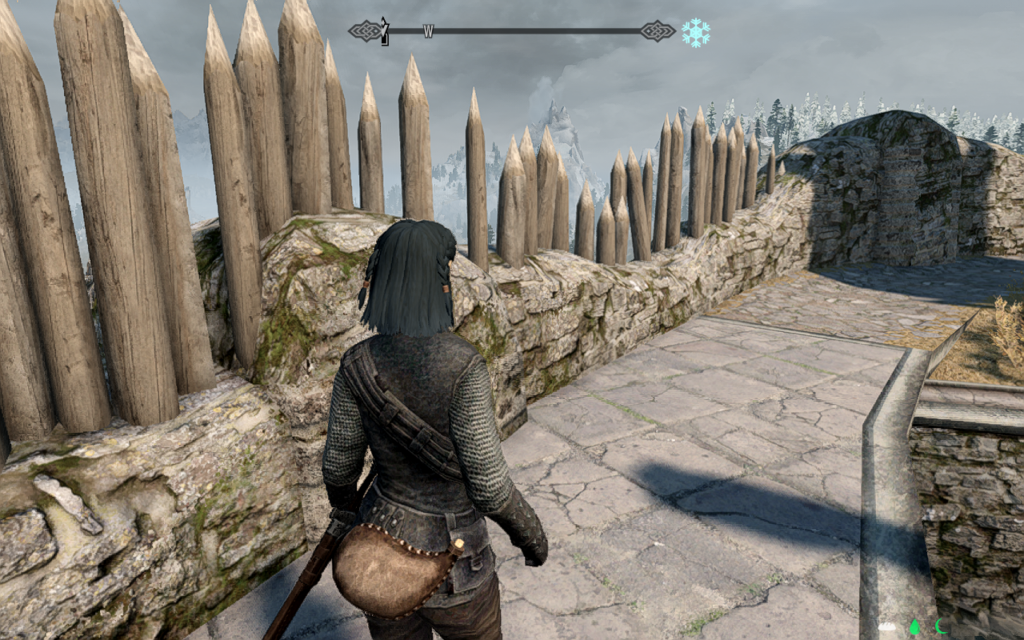
Maybe don’t sit down on that?

You can, at least, also configure where the waterskin appears by default. It can be on your right or left side, as well.

Some warnings about use of waterskins:

  1. Some places with running water do not appear to register with SunHelm as places you can successfully fill your waterskins. I was not able to get this to work in the stream in the boss chamber in Bleak Falls Barrow. Which may mean either that this won’t work in running water inside a dungeon, that it won’t work if the water isn’t really deep enough for you to stand properly within it, or both. Be on the lookout for this if you decide to use my config for your own playthrough.
  2. Both the waterskin and Tuxborn’s wearable lanterns use the same equipment slot! So if you turn on the one, you cannot have the other. You’ll have to choose which is more important to you. My personal choice on this is the lantern, since that’s way more critical IMO to a Tuxborn run. However, if you decide to use other light sources (torches, Candlelight spell, etc.), you should be fine with showing the waterskin in your preferred location.

Salt water is a thing SunHelm tracks, too. You can fill your waterskin at salty bodies of water (such as the Sea of Ghosts), but salt water isn’t drinkable. AFAIK you should be able to correct this problem at a cooking fire. I will be doublechecking this.

Waterskins appear to drop as random loot from slain bandits. So you will probably find yourself carrying quite a few more waterskins than you may have originally planned for! Keep an eye on how many you acquire, and if it starts being a problem, you may need to sell your extras.

Cold

SunHelm has a custom icon to track cold conditions, similar to the one in vanilla Survival Mode. By default this thing appears up to the right of the compass. In my install, the icon overlapped a bit with the compass, since I had made mine bigger for visibility. SunHelm’s MCM does allow you to adjust the positioning of that icon, though, so you can move it around if you need to.

SunHelm does also support showing Warmth ratings on gear, from what I’ve seen so far. I’ll be keeping an eye on how universal this is, and whether we have any armor sets in our load order that aren’t properly showing Warmth ratings when viewed in SkyUI.

So far in my testing, the Cold settings for SunHelm are more forgiving than vanilla Survival Mode. By which I mean, even if I’m in an environment where the air reports as freezing, this is not going to kill me in three seconds like vanilla Survival Mode does! SunHelm does not appear to have a way to make Cold conditions harsher on you, although you can adjust how fast you get cold.

Needs icons

At the bottom of the screen, SunHelm adds three icons that track your Hunger, Thirst, and Exhaustion status. I’ve seen these switch off between green, white, and yellow so far. There are accompanying notifications that show up where you’d expect, in the top left corner of the screen, if you need to eat, drink, or rest. Initial changes to those statuses will also give you a prompt to tell you what’s going on, but that happens just once.
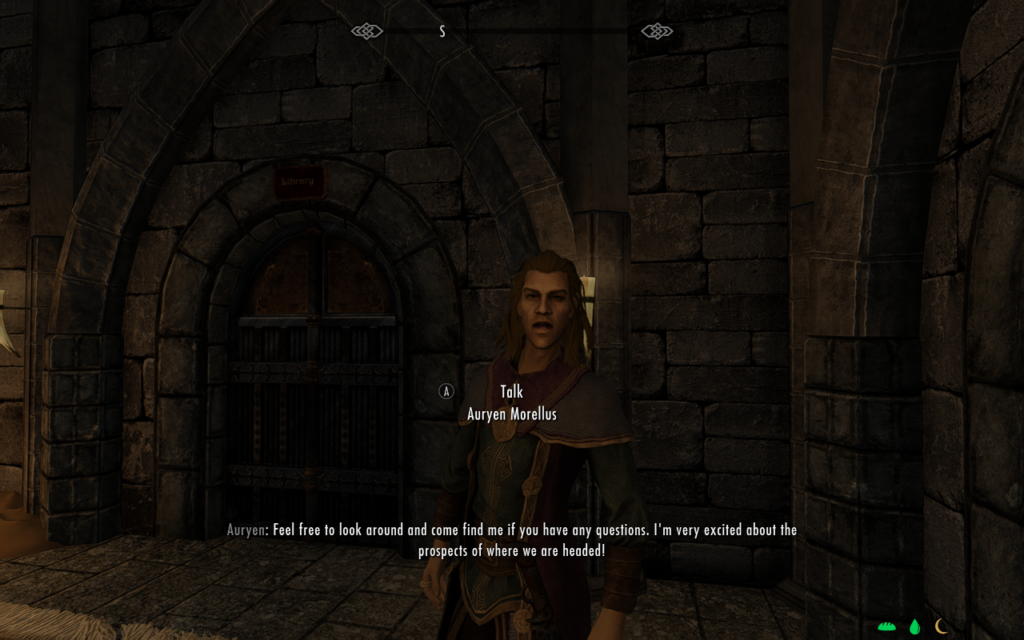
Where I’m headed is to bed, Auryen, because I’m wiped, and you did promise me lodging, RIGHT?

The Needs icons can be moved if you don’t like their initial placement. Look for the relevant settings under Display and Notifications in SunHelm’s MCM. You can change the icons to alphabetical symbols as well, if you wish.

Here’s another screenshot to show alternate placement of the Needs icons, where I put them up on the Top Right portion of my screen and set them to the immediate right of the Cold icon. The compass is not visible here since this is from the Campfire config, with Skills of the Wild active, otherwise you’d see the compass immediately to the left of the Cold icon:

SunHelm Cold and Needs icon visible in Paradigm chargen room (with no compass because of Skills of the Wild)

Unknown food items

SunHelm supports keywords on food, and if you eat a thing it doesn’t recognize, it’ll even prompt you to tell it what kind of food it is:
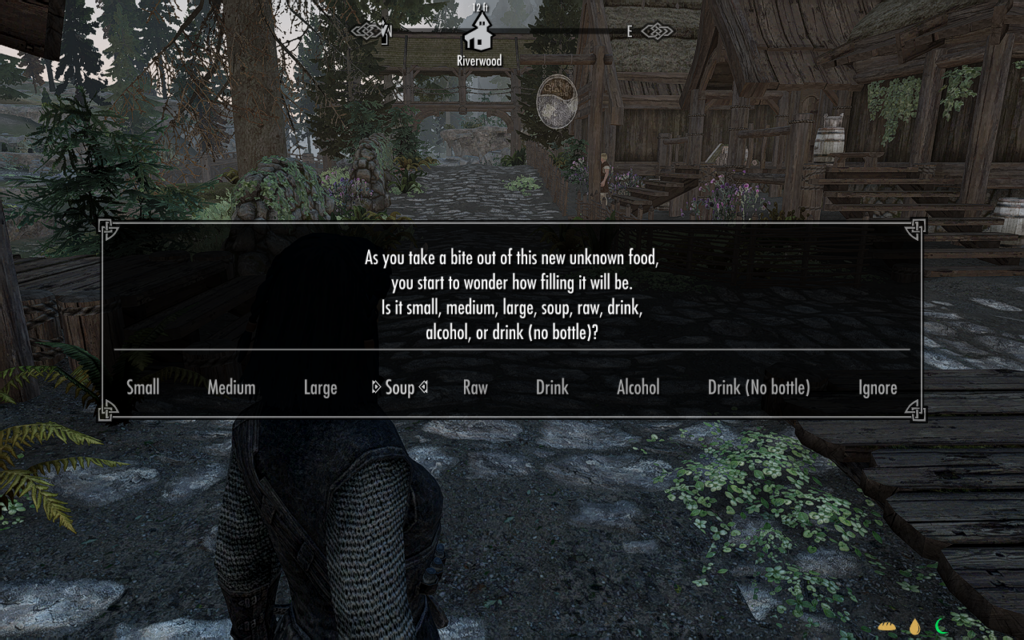
Neat!

My personal config choices

Things I’m doing to configure my setup are as follows, do these or not according to your own preferences:

  1. Deactivated the carry weight penalty. I’m a loot goblin, dammit, I want to carry all the things. 🤣
  2. Making sure fast travel is still enabled. I’m going to try to play a no-fast-travel run anyway, but fast travel needs to be on in order for the Dev Aveza to work, so not turning that off.
  3. As noted above I am keeping the setting for showing a visible waterskin off, since it interferes with wearable lanterns, and I consider lanterns higher priority
  4. Tuxborn player Gallowsborn alerted me that SunHelm’s installer includes an optional module for turning on diseases support, so I will have that on
  5. As noted above in the Cold section of the page, I made my compass a bit larger via the fCompass variable in skyhud.txt in the SkyHUD mod. Namely, I set it to 1.1. This caused me to have to use the above described settings to scoot the Cold icon 30 pixels to the right to avoid overlap. If you’re not doing anything to Tuxborn’s default size for the compass, you probably won’t need to care about this.
  6. I decided I wanted the Needs icons to be placed to the immediate right of the Cold icon. This required me to set the following things:
    • Placement of the Needs icons to be in the Top Right section of the screen
    • Scooting the icons 130 pixels to the left to get them close to the Cold icon (which meant -130 in the X axis of the settings)
    • Scooting them down 10 pixels to better center them along the same line as the Cold icon and the compass (so 10 in the Y axis of the setting)
  7. I also decided I do not in fact like having to sleep to level up. Ability to level up in the middle of a long dungeon can mean the difference between making it past hostile draugr and those draugr handing you your ass! And if you’re not anywhere near a safe place to sleep because you are in fact in a long dungeon, then you’re screwed until you can make it back out again and then camp. So I’ll likely be using Survival Control Panel just to toggle that off. Whether or not I’ll use any other settings in it still remains to be seen.

Playtesting notes so far

  1. SunHelm’s optional diseases support seems to work very similarly to how diseases are handled in vanilla Survival Mode. Namely, if you get a disease at all, it has the risk of advancing to more severe stages if you don’t get it cured. SunHelm is not, however, using the exact same extra diseases that vanilla Survival Mode does. Details can be found on this page which is part of a small wiki for how SunHelm works.
  2. Blade and Blunt has an injury system which is intended to be used with Starfrost, and I can confirm it does not activate in either the Campsite or Campfire versions of this config. Whether or not it will work as expected in my scenarios is as of yet undetermined.
  3. SunHelm seems to be a lot more forgiving with Cold than vanilla Survival Mode is. I still see warnings about the air being freezing in certain areas (such as by the bandit tower near Bleak Falls Barrow), but those conditions won’t kill me in three seconds like vanilla Survival Mode does. So I’m happy with the default settings, so far.
  4. Beta 3 includes No Compass in Dialogue, which includes a hotkey to toggle off the compass completely. If you like this for screenshot purposes, you should be aware that that hotkey will not turn off the SunHelm needs icons. Fortunately, you can solve this problem by getting into the SunHelm MCM settings under Display and Notifications. There’s a hotkey setting for toggling the icons on and off. Set this to the same hotkey used by No Compass in Dialogue, which is the single quote. This will let you toggle off the compass and the icons at the same time and keep your screenshots UI-free.

Things I’ll be testing next

  1. Experiment with Cold settings to see if I need to dial them down some to make them be less annoying ✅
  2. Keeping an eye out for any armor pieces or jewelry that aren’t reporting Warmth ratings in SkyUI
  3. Experiment with the waterskin placement, just to doublecheck that it doesn’t overlap with my preferred weapons ✅
  4. Verify how to purify a waterskin filled with salt water ✅
  5. And preferably also what places you get salt water from? Assuming this will be the Sea of Ghosts anywhere along the north edge of the map, but probably also in Dawnstar and Windhelm…?
  6. Verify what happens if I bring a salt pile and an empty waterskin to a cooking fire, since that’s apparently a thing, and it makes no sense to me yet
  7. Re-install SunHelm to activate the diseases module in the installer ✅
  8. Can I in fact turn on the Blade and Blunt injury system in a SunHelm config? Let’s find out!

As Angela Highland, Angela is the writer of the Rebels of Adalonia epic fantasy series with Carina Press. As Angela Korra'ti, she writes the Free Court of Seattle urban fantasy series. She's also an amateur musician and devoted fan of Newfoundland and Quebecois traditional music.