Initial impressions of Oblivion Remastered
I bought Oblivion Remastered yesterday as soon as I saw the news that it was being released. And last night, I fired up a playthrough to redo Ganniwer, the character I’d started via my attempt to get an Oblivion playthrough going.
Here’s a post to cover my initial impressions of this version of the game, so far. Details behind the fold.
Graphics
Let me get this out of the way first and foremost: the new version of Oblivion Remastered is Steam Deck Verified. But, fellow Steam Deck players, we are not going to get the best experience graphically speaking.
Things do IMO look better than original Oblivion. But the in-game Graphics settings by default came in at Low. Hitting the Auto-Detect button provided in the settings also defaults to Low.
I experimented with setting them to Medium and High, but that was definitely a performance hit. So any way you slice it, if you want to play this thing on a Steam Deck, you won’t be hitting the same sort of amazing graphics that were shown off in Bethesda’s livestream yesterday. It just ain’t gonna happen.
That said, Steam Deck players out there are already experimenting with how to get the best possible look out of the thing, while also not sacrificing performance. I found this one user’s video and will be testing out his suggested settings:
Running in my Windows VM is not happening
I discovered, much to my disappointment, that while I could install the new Oblivion in my Windows 11 VM on my Mac, the game itself would not launch.
When I tried to launch it, I got this error message:
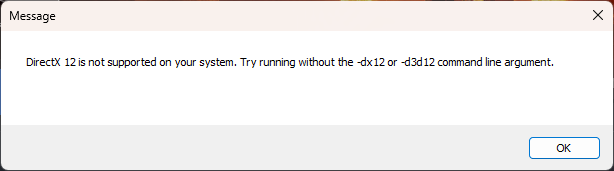
So I’m going to have to poke at this a bit, and figure out if there’s a way to launch by removing the arguments this error message is talking about.
I’m also going to see whether it’ll launch if I run Crossover. It’d be real nice if I could run it via Crossover, because if I’ll need to put out additional money in order to run this game on my Mac, I’d much prefer to throw money at Crossover vs. updating what version of Parallels I’m running.
More on this as I know it.
Character generation
I was very confused out of the gate making my character, because I could not find any toggle or other control for setting her Sex. And I was about to get pissed that the game wasn’t going to let me play a female Champion of Kvatch–until I realized that the UI was offering me two Body Types, 1 and 2.
And I went, “Wait… is this their way of offering gender selections without actual obvious gender markers?”
This turned out to be the case. Body Type 1 maps to female. Body Type 2 maps to male. I confirmed this just by playing with those selections as I clicked through the ten race options, and verified that Type 1 on each definitely looked more female, and Type 2 looked more male.
Now, whether this was intentional on the part of Bethesda and Virtuos… I don’t know. It’s certainly possible that this is their unspoken way of encouraging players to choose whichever body type appeals to them without worrying about the associated gender marker. (Which, I’m sure, somebody will scream about, and use it as a reason to accuse them of being “woke”. Insert eyeroll here.)
When I actually went into playing through the escape with the Emperor and the Blades through the sewers, though, I still got female pronouns in dialogue describing me. Which is actually what I wanted, so that was all good. But this also means that if you are more genderfluid than me, or non-binary, just expect you’ll still get either female or male pronouns in dialogue referencing you. I’m fairly sure that digging further into that and making the dialogue about the player character accommodate different pronouns would have been more work than they would have been willing to do, though. A bunch more lines would have had to be recorded to allow for it.
And it’s also just possible that the Body Type 1 and Body Type 2 markers in the chargen were just a bug, and that they might actually relabel them as Female and Male later in a patch. We’ll have to see what happens.
Aside from that, I was slightly disappointed that the chargen process still had a very old-school feel about it. I was hoping to be able to make a character that’d look a lot more like the Bosmer I know from Skyrim and ESO… i.e., looking more like realistic people. Oblivion Remastered, though, does not do that. It seems to be holding to the aesthetic of the original version of the game, only with more graphical detail.
And I can’t really argue with that, even if the chargen options do mean you can do funky things like have a purple-skinned Bosmer with green hair, if that floats your boat.
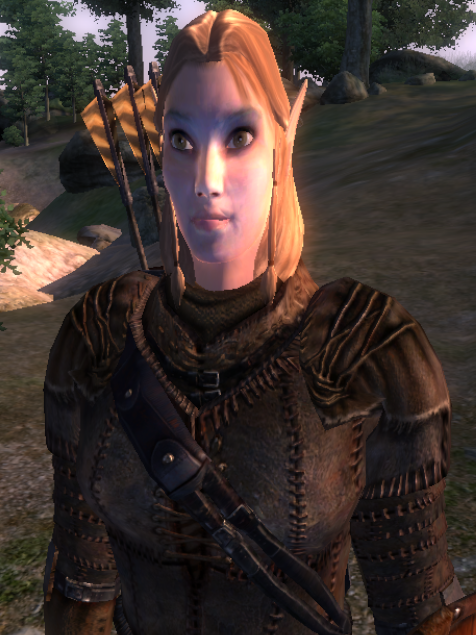
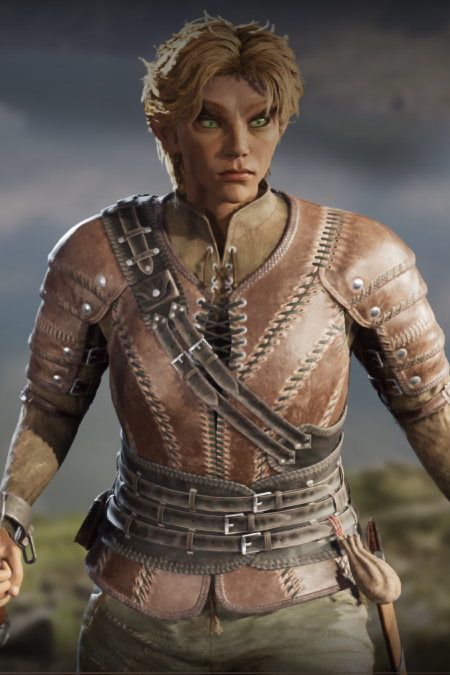
I did not get that adventurous. 😉 My goal was to basically re-do the same character I built in the original, and I wound up with something that satisfied me.
Here’s a side by side comparison of the two versions of Ganniwer!
A few additional things I liked about the chargen options:
- All the various hairstyle options seemed to be available to select, even the ones that leaned towards a masculine look, even though I chose Body Type 1/female.
- Several funky colors were available for hair, but there were actually two colors to set, one for tips and one for roots, so you could get a bit of depth to your hair color.
- Mouth options allowed for a default “mood” for your character. I set her a little towards the “Sad” end of that slider, because I’m still going with original Ganniwer’s backstory, i.e., stressed as fuck over her sister going AWOL in Morrowind, not to mention being thrown into the Oblivion Crisis. So I figured it was going to be in character for her to look slightly stressed all the damn time.
- I did try to aim for the “sweet-faced Bosmer” look I wound up with for original Ganniwer, hence rounding out her face a bit, and giving her one of the available hairstyles that looked cute to me without looking dorky.
Overhauled NPCs and conversational interactions
NPCs definitely looked better, but here also, it was clear that the new version is still trying to maintain the feel of the original. So all the NPCs I’ve met so far have rather less potato-like heads, but there’s still a bit of that going on. And talking to everybody still triggers the hard zoom in on their faces, although you can apparently turn this off in the settings if it bugs you. I’m going to leave it on for now, just because the zoom didn’t feel as drastic to me as it does in the original.
Here’s the original Uriel Septim, and the new version:
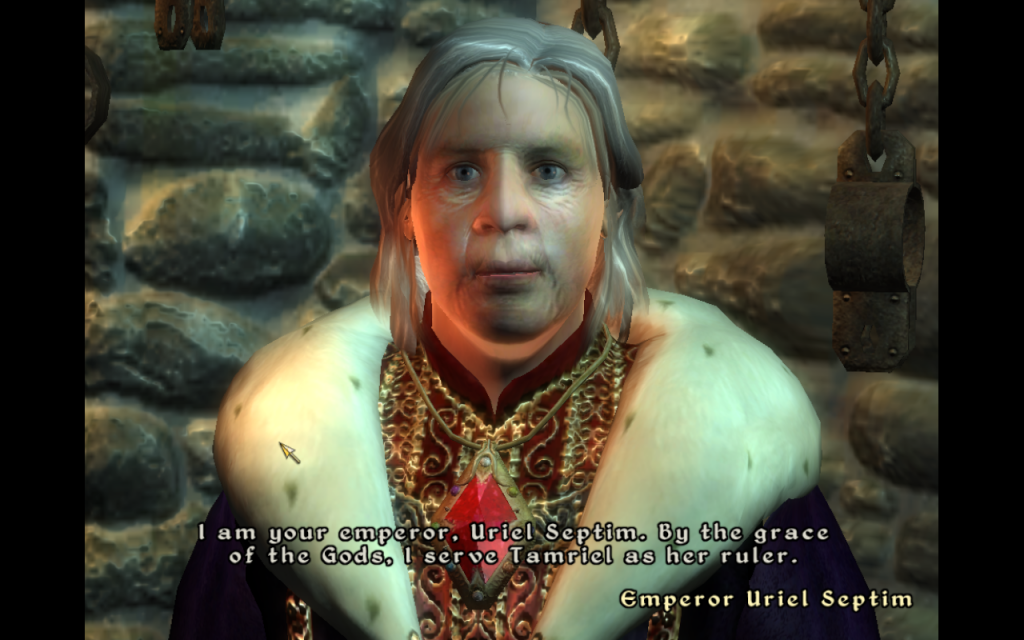
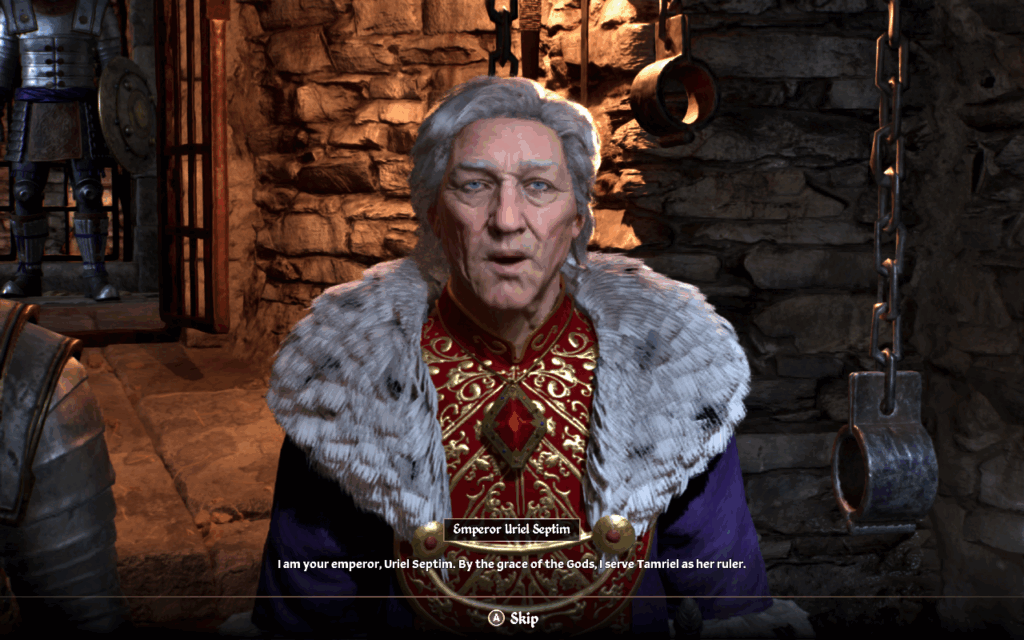
So as you can see, ol’ Uriel still has a bit of a potato head going on, but a potato with a lot more shape to it. 😉 And which looks closer to an actual human head!
The bigger thing that stood out for me in conversations with the Emperor, though, was that he was a lot more expressive than he was in the original game. His facial features animated very well as he delivered his lines, and very much helped convey his sadness and resignation to what was about to happen.
And, of course, his being voiced by Sir Patrick Stewart was still delightful. ❤️
You can also see in these two screenshots of Uriel that the overall game font has changed. To my eye it looks like this is more of the idea of “upholding the spirit of the original, but make it look more modern”.
Later, once I got out into the world and started seeing more NPCs, I ran into multiple Argonians, Khajiit, and Orcs. I’d seen in Bethesda’s livestream that they’d recorded a bunch more lines to improve the sounds of such random NPCs and make them sound more like their counterparts in newer games. I can confirm that this is indeed the case. NPCs of all three of those races did indeed sound closer to their counterparts in Skyrim and ESO.
Tutorial and opening sequence
The overall opening sequence of Oblivion is still the same. You’re a prisoner, and surprise, the Emperor and the Blades show up and barge into your cell, because the Blades are trying to hustle Uriel Septim out of the palace to protect him from assassination.
And, surprise, the Emperor recognizes you! Because he’s dreamed about you, you see, and this motivates him to give you the Amulet of Kings, along with an admonition to go find his last surviving heir, just before assassins take him out.
This time through, it felt more fluid to me, mostly. I can confirm that yes, the game does now have native controller support, and that was definitely nice.
Game controls and UI
Default controller button mappings seemed pretty good to me, with the exception of B being mapped to Sneak, a choice I may have to alter just because I’m too used to B bringing up the compass control in Skyrim, or bringing up my inventory in ESO. I want Sneak to trigger if I click on my thumbstick, dammit!
The one beef I did have about controller button mappings, though, is that the in-game settings did not seem to be able to register the Steam Deck’s back buttons. I tried to map my R4 button to QuickSave, since that’s a thing I have mapped in Skyrim, but the in-game UI wouldn’t let me do it.
I still need to try mapping that function to a key instead, and mapping R4 or any other back button to that, too. I’ll report back on that.
This new version has an in-game radial menu you can assign favorites to, and I’m at least somewhat sure this wasn’t in the original game…? However, I’m still not clear on whether this thing is accessible with a single button click. If it’s not, I may need to do a radial menu off my left trackpad, as I’ve done for Skyrim and ESO. I’ll report back on this, too.
Overall I really like how they’ve restructured how the UI works. Here, too, I see the idea of holding to the spirit of the game, while making it more modern-looking.
By default, I saw that I had a little dot as a crosshair when I was wielding a blade, or when I had nothing wielded. As I’ve learned in Tuxborn, I am not a fan of dot-sized crosshairs. The crosshair changed to something that looked more like a Skyrim or ESO crosshair when I had a bow, though, presumably to help with aiming. I’ll have to dig into this a little further, and see perhaps whether there’s an INI file setting or something, to customize this.
Gameplay
Combat felt really smooth. I still need to experiment with controller mappings, though, so that I can get to a point of being able to quickly switch between a blade and a bow.
Magic
Still really liking how you launch spells in Oblivion, though this time through, it seemed like I was able to launch off of both hands? I need to doublecheck that. Because I’d queued up the Clairvoyance spell and was regularly launching that off of my right hand, but at one point I triggered Healing off my left hand without actually meaning to.
So it seems like there’s behavior here that’s closer to how Skyrim does it, where you can queue up a spell on either hand. But throwing spells also does not seem to require you to un-wield a weapon? I need to poke at that further, to confirm.
I really liked the effect fired off by Clairvoyance. It still works as I expect, i.e., throwing off a blue trail in the direction of where the quest objective wants me to go. In Skyrim, the trail’s sort of a wispy blue smoke. Here, though, it was a nifty trail of blue sparkles.
All in all
Graphically speaking, Oblivion Remastered was less than I was hoping for… but nonetheless, I feel it definitely looks better than the original.
I’m mostly really happy with all other aspects of it, aside from the bits I noted above as requiring further investigation. And if I can do anything at all to get it working on the Mac, that may also solve the whole problem of the Steam Deck not really being up to the task of getting to the higher end of the graphical spectrum.
So yeah. Ganniwer Take Two is now live, and I’ll keep documenting her adventure moving forward. ❤️

Angela Korra'ti
As Angela Highland, Angela is the writer of the Rebels of Adalonia epic fantasy series with Carina Press. As Angela Korra'ti, she writes the Free Court of Seattle urban fantasy series. She's also an amateur musician and devoted fan of Newfoundland and Quebecois traditional music.