Survival Mode R11 config for Tuxborn 1.2 (Campfire version)
This proposed R11 config for Tuxborn 1.2 is to add support for Survival Mode runs. This version of the config is for using Campfire as the camping mod. For those interested in Campsite instead of Campfire, have a look at Survival mode R11 config for Tuxborn 1.2 (Campsite version) instead.
Also, see Survival Mode R11 config for Tuxborn 1.2 (SunHelm settings) for my intended setup for SunHelm’s portion of this configuration.
Current expected list of mods and patches
First and foremost: Campfire is heavier weight than Campsite is, so as a result, there are more patches I recommend considering adding for a Campfire-based version of this setup. Here is the full list of things I recommend adding to Tuxborn’s load order, in their expected order:
- SunHelm Survival (including the patch for Wyrmstooth provided in its installer)
- SunHelm – CC Farming Patch
- SunHelm Survival – Compatibility Patches
- EVG Conditional Idles – SunHelm Shivering Fix
- Falskaar – SunHelm Cold Patch
- Midwood Isle – Sunhelm Buckets
- Static SunHelm Rewritten
- SunHelm – BS Bruma Patch
- Campfire
- CC Fishing Campfire Patch: This lets you cook fish added by the AE at any campfire (multiple patches appear to be available to do this, so if you don’t want this one in particular, find any other one that you want to try)
- Campfire – Script Optimization: Fixes some script-level issues, recommend trying this given Campfire being script-heavy
- Campfire – Bits and Pieces Hoarding Fix: Recommend this one because I personally used it in a pre-Tuxborn playthrough, fixes an issue with Sayma in Bits and Pieces spawning infinite copies of Campfire items in her store inventory
- CS’ Campfire Item Descriptions: Suggest this one because Tuxborn does make an effort to give descriptions to things that don’t otherwise have them visible in your inventory, and this would be in keeping with that
- Campfire Skillrate Alternative: Since we have Static Skill Leveling in our load order, this makes Campfire play nicer with that
- Denji – Custom Skills Menu for CSF v3: First of two mods needed to plug skill trees for both Campfire and SunHelm into the custom skills menu Tuxborn is already using
- Survival Skills – Custom Skills Framework for Campfire and Add-Ons: Second of two mods to plug both Campfire’s and SunHelm’s custom skill trees into the custom skills menu Tuxborn is already using
- Campfire Powers Decluttered: Creates a unified “Resourcefulness” power so that various abilities from Campfire can all be invoked from the same overall power, and cut down on menu clutter
- Campfire Sunhelm Water Integration: Eying this because it merges SunHelm’s Fill Bottles power into Campfire’s Resourcefulness power, added by the previous mod
Optionals
As on the Campsite version of this config, here are some more mods I’ll call out here even though I will most likely not be using them:
- Water-Borne Diseases for SunHelm: I like the idea of this one, but I’m not feeling quite hardcore enough in my survival mode expectations to try it out! People who’d like to be harder core than me in your survival run may want to give this a look, though.
- Campfire Patch for Water-Borne Diseases for SunHelm: If your personal Survival Mode preferences are hardcore enough to include Water-Borne Diseases for SunHelm, then you’ll want this patch to make it play nicely with Campfire
- SunHelm – Ultrawide Patch: I play on Steam Deck so this is absolutely not relevant to me. However, we periodically have Tuxborn players ask about ultrawide support. The Tuxborn team can’t give ultrawide support, none of us have appropriate monitors to doublecheck configurations! But I’m offering this in case anyone who wants to replicate my config is playing on an ultrawide monitor. If that’s you, you’ll want this mod too.
- Survival Control Panel: Overlaps with stuff that SunHelm sets, but not entirely. If you want to be able to turn off having to sleep to level up, you should add this mod in too.
- Skills of the Wild: Add this to the load order if you want to fill in the four empty slots in the custom skills section added by the Survival Skills mod linked to above.
Things I activated when installing
For SunHelm itself, I did the following four things:
- Reinstalled SunHelm on this profile as a separate install, so that I could do different settings on it, but most people won’t have to do that unless you actually want to try both versions of my config
- Turned on support for the Campfire-compatible skill tree
- Turned on the optional module to overhaul how diseases work, because okay sure why not
- Turned on the patch that allows for SunHelm to track your needs status while on Wyrmstooth
For SunHelm Survival – Compatibility Patches, I explicitly turned off the patch for Interesting NPCs, on the grounds that Gourmet in our load order is also patching against Interesting NPCs. And I wanted to give precedence to Gourmet on that, to uphold as much of Tuxborn’s load order as possible.
Where I’m putting things in the load order
I noted this on the Campsite version of this config and will say it again here: the most critical thing to remember when doing a Rule 11 on the Tuxborn load order is that everything you want to add, and I do mean everything, needs to be somewhere above the map mods we’re using. Our map mods really, really, really want to be last in the load order, full stop. It doesn’t matter what you’re adding. If it stays after the map mods in the load order, the maps will break.
Where to put Campfire in the load order
I learned during investigating this version of the config that Campfire has an issue with containing a DLL which has since been supplanted by PapyrusUtils SE. Tuxborn includes PapyrusUtils SE in our load order. So it’s important to make sure that Campfire is before PapyrusUtils SE in MO2.
If you don’t do this, then you’ll see what I did: a big string of bizarre error messages as soon as you fire up the game. Here’s an example of what the first of these error messages looked like, so you know what to look for. You do not want to see this when trying this config:
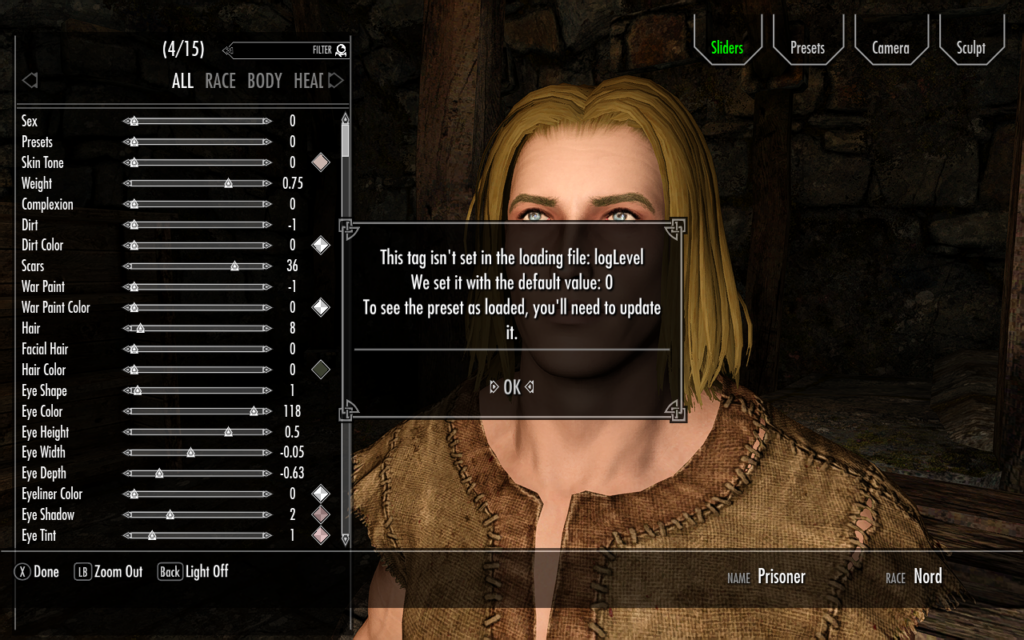
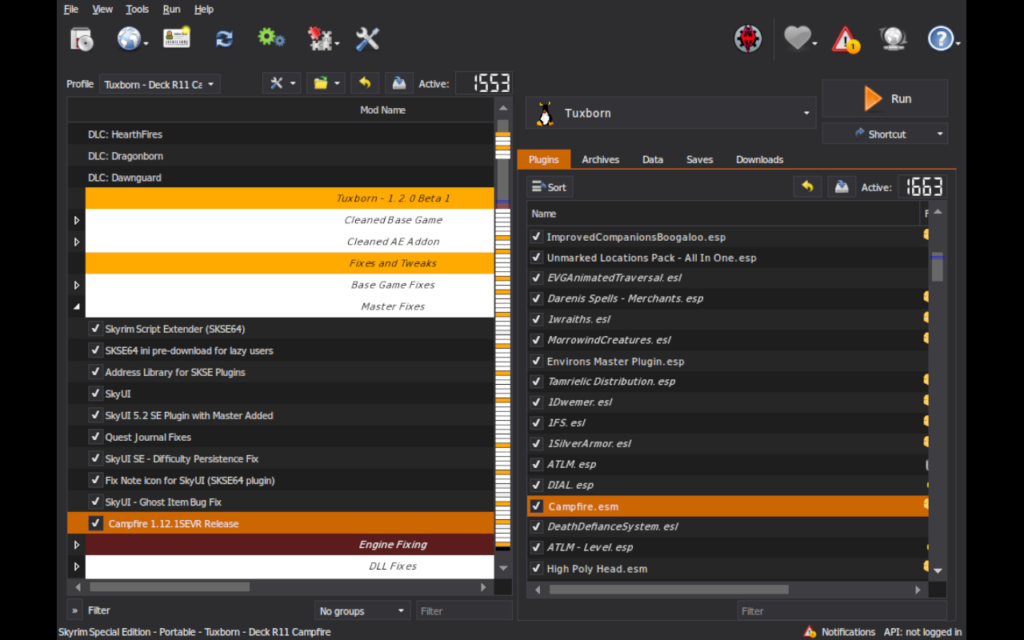
These errors all went away when I put Campfire into a better spot in the load order. My solution for this was to make Campfire last in Tuxborn’s “Master Fixes” section, which is right before the “Engine Fixing” section. Campfire’s main file added is Campfire.esm, and that file name suffix indicates that it is a master file. So I deemed it appropriate to stick the file in that section. And more importantly, “Engine Fixing” contains PapyrusUtils SE! So this made sure that the proper version of the DLL gets loaded when the game starts up.
What let me figure this out was the second sticky post on the Posts page for Campfire on Nexus. So have a look at that if you want more in-depth info.
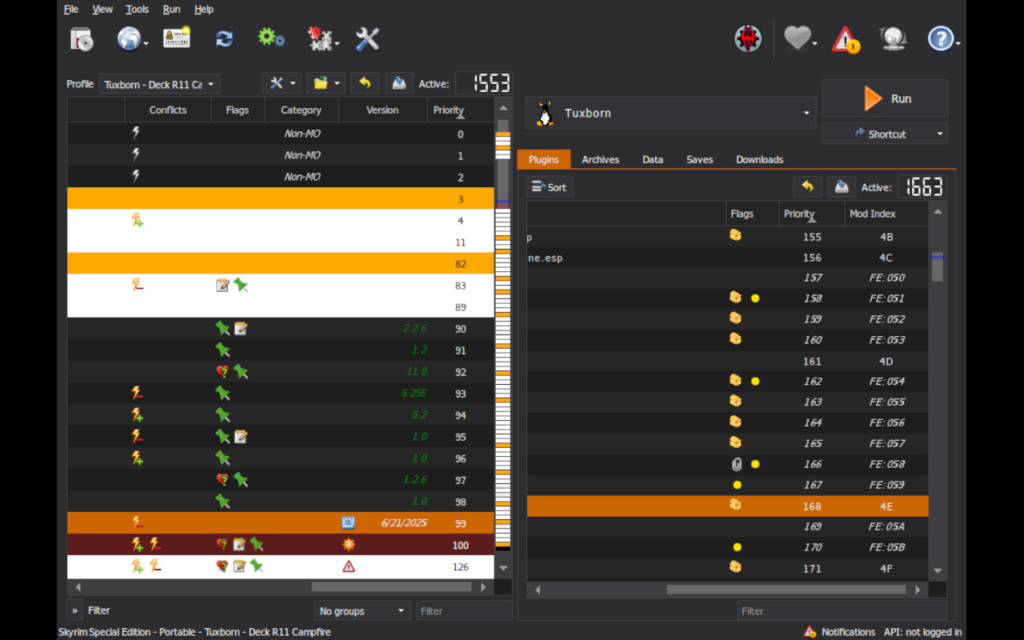
Here are screenshots of what my load order changes for Campfire.esm look like:
Where to put everything else
Aside from Campfire.esm, I followed the same idea I went for in the Campsite version of this config: creating a “SunHelm Survival Mode” section in the load order, right before “Late Loaders”. And I put everything else in there, SunHelm stuff as well as all the additional Campfire patches I wanted.
Here’s what that portion of the load order looks like. Since this list of patches is longer than in the Campsite version of the config, there’s a couple of extra screenshots to show that.
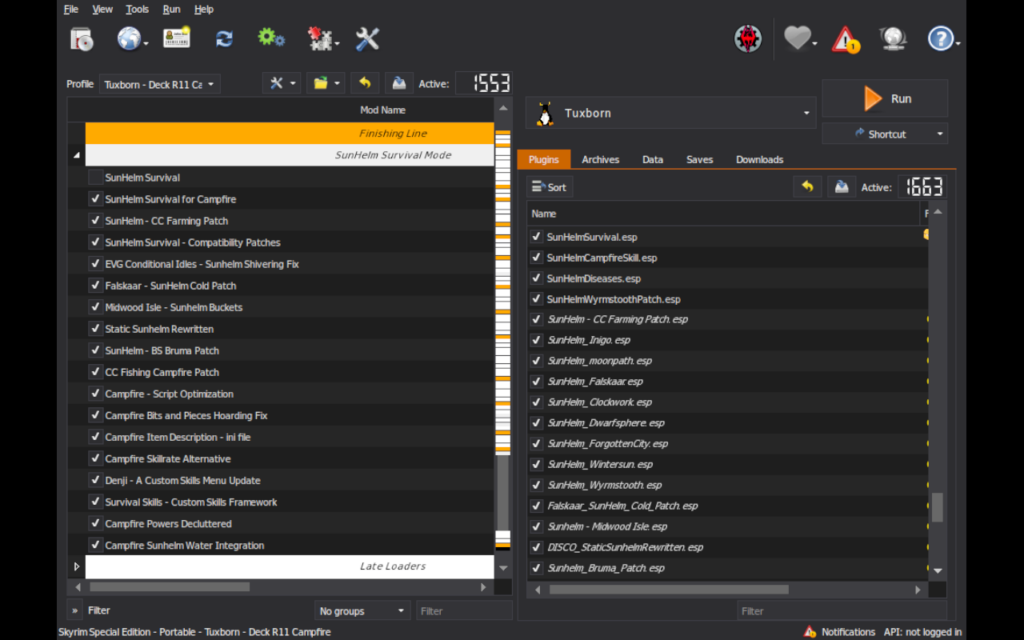
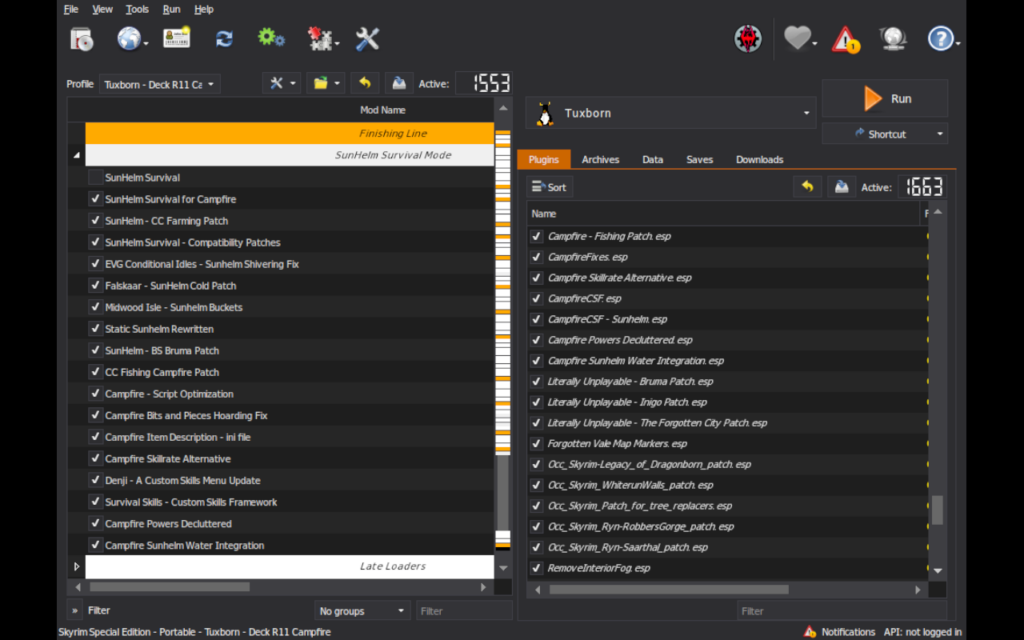
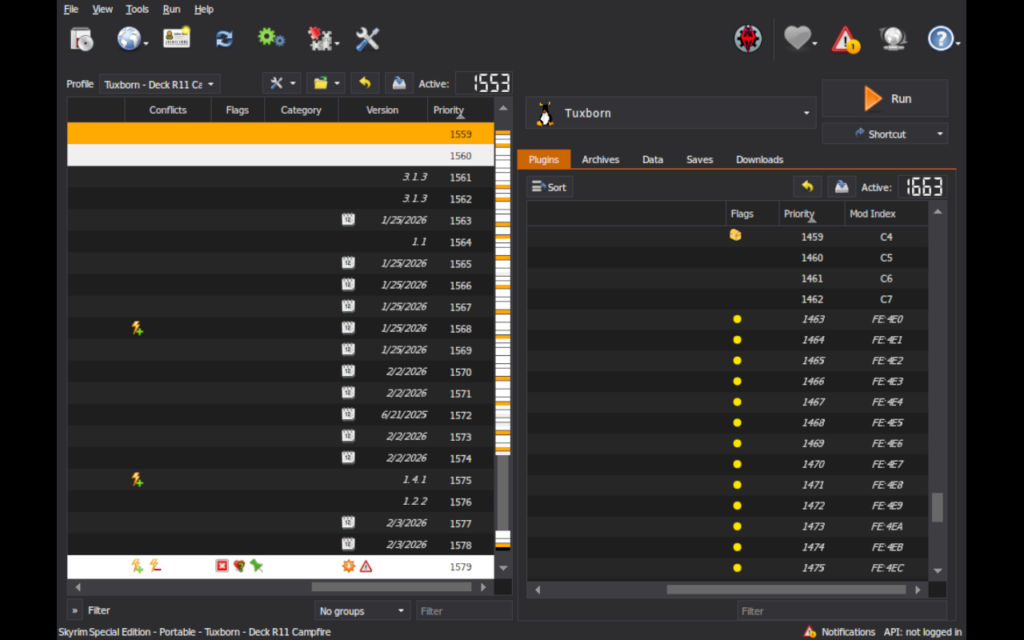
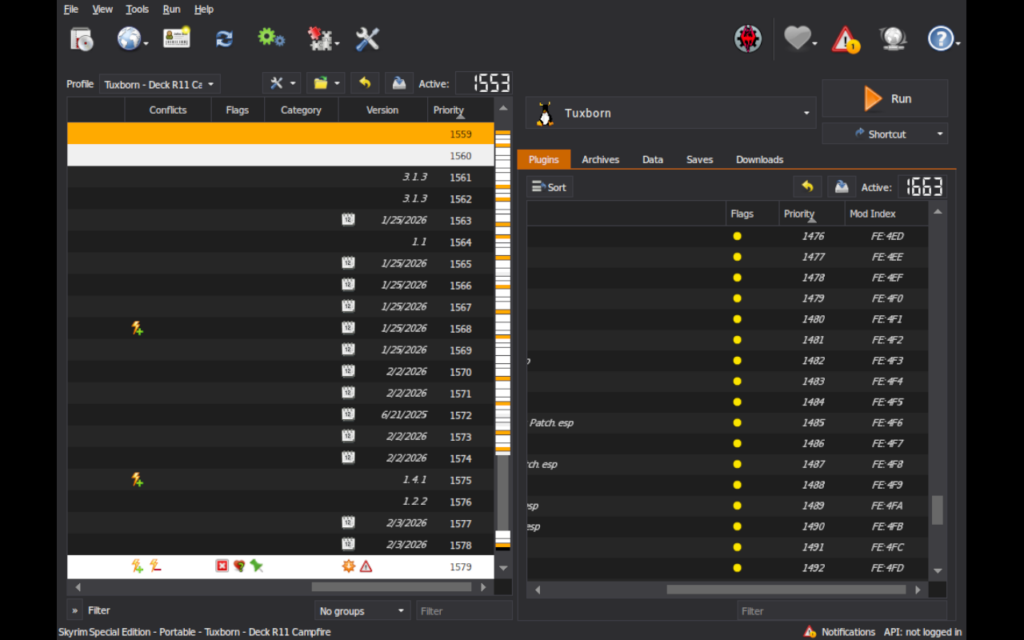
‼️ Caveat: If you’re using a Handheld or Desktop profile, or if you’re using Tuxborn MCO – Deck, the load order numbers WILL BE DIFFERENT FOR YOU. You may also have different numbers involved if you’re going to R11 anything else into your load order. Use my numbers as a guide, not as an exact requirement! ‼️
Playtesting notes so far
- Confirmed tents, cloaks, etc. showing up for sale as expected with merchants (I tried Bits and Pieces).
- Confirming craftable items showing up as expected at tanning racks.
- With the patches I’m using to add skill trees to Custom Skills, there’s a confirmed “Survival” option now on the Custom Skills section of the tween menu. Going into that, I see Camping and Endurance as available options, one for Campfire and the other for SunHelm. There are empty slots between them, four in total. Those are for if you’re also running Skills of the Wild, as I noted above. Disregard the empty slots for this config, unless having them empty bugs you, in which case add Skills of the Wild to the load order.
- Campfire’s “Travel Cloak, Linen” has clipping issues when you’re in third person and walking, your arms clip through the cloak as you move. Consider not being in third person, or else use some other kind of cloak (like the Guard Cloak craftable with the unmodded Tuxborn load order).
Things I’ll be testing next
This config isn’t as far along yet as the Campsite version, but here’s my to-do list so far:
- Read up on all proposed mods and see if any of them have any known problems with things in our load order ✅
- Spin up a test config and do the same load order placement testing that I did with the Campsite version of this config ✅
- Review all mods in SSEEdit to look for any conflicts that will require load order placement finessing ✅
- The second of the two mods I want to try to plug SunHelm’s and Campfire’s skill menus into the overall custom skills menu tree Tuxborn is using appears to have a bug in it, so I will need to follow up on that when the mod owner releases an update, which will hopefully be soon as it’s getting active and current development ✅
- Playtest, once SSEEdit is confirmed to not have any obvious glaring problems about the mods I’m dropping in

Angela Korra'ti
As Angela Highland, Angela is the writer of the Rebels of Adalonia epic fantasy series with Carina Press. As Angela Korra'ti, she writes the Free Court of Seattle urban fantasy series. She's also an amateur musician and devoted fan of Newfoundland and Quebecois traditional music.